
Webhooks
Manage webhook destinations for DryRun Security finding notifications. Supports Slack and generic HTTP endpoints.
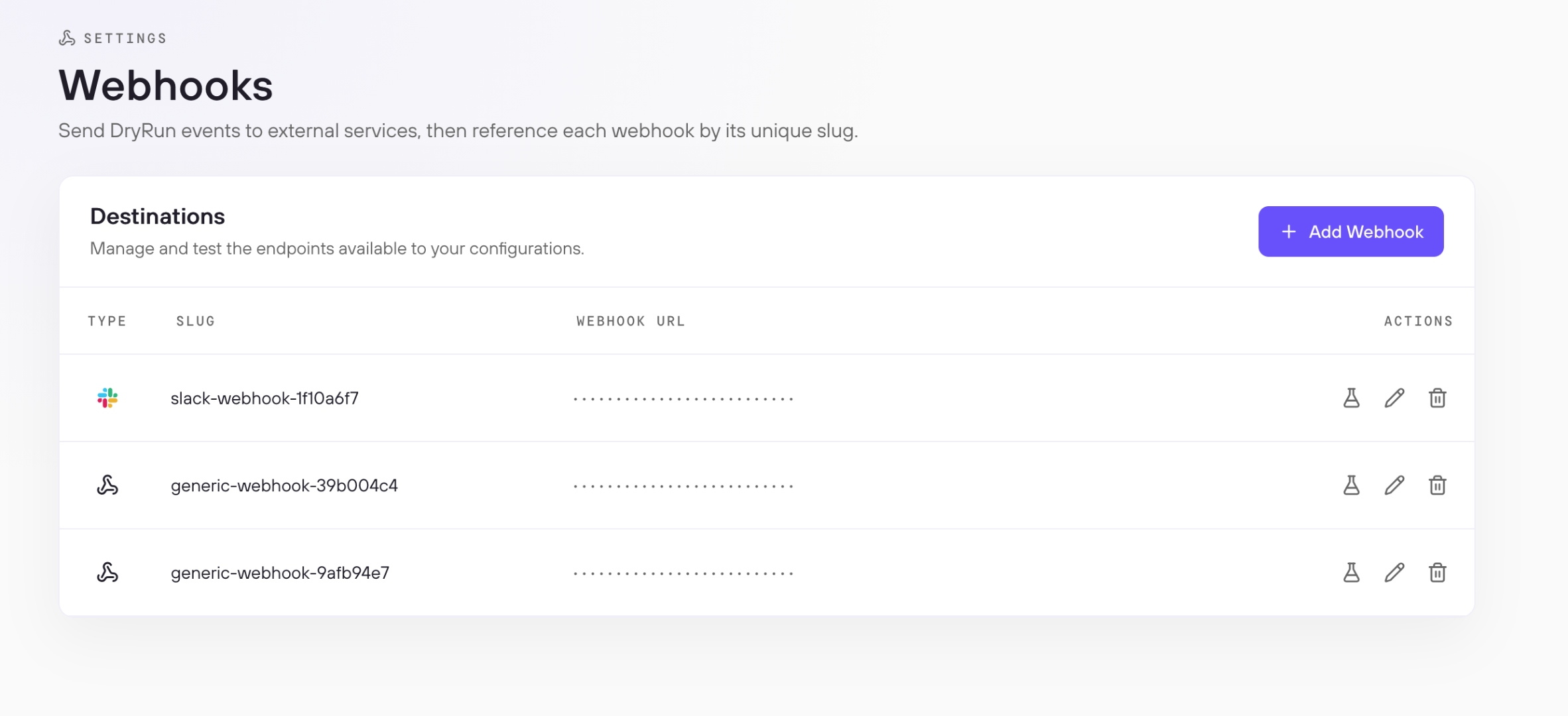
The Webhooks page manages the endpoints DryRun Security sends finding notifications to. Each webhook has a unique slug used to reference it in PR Scanning Configurations. DryRun Security supports two types: Slack webhooks, which deliver findings as formatted channel messages, and generic webhooks, which send a JSON payload to any HTTP endpoint.
When Webhooks Fire #
DryRun Security triggers a webhook in two scenarios:
PR findings - When a PR scan detects findings that meet or exceed the minimum severity threshold defined in the PR Scanning Configuration, the webhook fires for every repository covered by that configuration. Webhooks are PR-specific: DeepScan and SCA findings do not trigger webhook notifications.
Daily digest - A webhook endpoint can also serve as the delivery target for the daily digest. The daily digest is configured under Settings > Account > Notifications, where you enable it and select which webhooks receive the summary.
PR finding notifications are configured in the Notifications tab of a PR Scanning Configuration.
Adding a Webhook #
Click Add Webhook, give the webhook a name, and paste in the endpoint URL. The name becomes the webhook's slug and is how you reference it in configurations. DryRun Security detects the type automatically based on the URL:
- Slack - If the URL is a Slack incoming webhook URL, the type is set to Slack. DryRun Security formats the payload as a Slack Block Kit message so it renders correctly in your channel, including the repository name, PR title, severity level, and a direct link to the pull request.
- Generic - For any other URL, the type is set to Generic and DryRun Security sends the standard JSON payload described in the Payload Format section below.
Click Save. The webhook appears in the Destinations list and is ready to assign to configurations.
Managing Webhooks #
Each row in the Destinations list has three actions:
- Test - Sends a sample payload to the endpoint to confirm the connection is working
- Edit - Update the webhook name or URL
- Delete - Remove the webhook permanently
Adding to a Configuration #
A webhook only fires for repositories it has been assigned to in a configuration. To activate a webhook, open PR Scanning Configuration, go to the Notifications tab for the relevant configuration, and select the webhook by slug as the notification endpoint.
Payload Format #
Generic Payload #
DryRun Security sends an HTTP POST with a JSON body to your endpoint when a scan completes. The body includes PR context, scan metadata, and the full list of findings.
{
    "dashboard_url": "https://app.dryrun.security/pull-requests/00000000-0000-0000-0000-000000000000",
    "github_url": "https://github.com/org/repo/pull/123",
    "risk_threshold": "high",
    "org": "your-org",
    "repo_name": "your-repo",
    "repo_full_name": "your-org/your-repo",
    "pr_number": 123,
    "pr_title": "Add payment endpoint",
    "pr_status": "open",
    "branch": "feature/payments",
    "commit_author": "developer",
    "issue_status": "open",
    "run_time": "2026-06-09T16:48:44.960558Z",
    "results": [
        {
            "id": "00000000-0000-0000-0000-000000000001",
            "finding_type": "pullrequest",
            "type": "Missing Authorization on Payment Endpoint",
            "filename": "src/payments/handler.py",
            "line_start": 42,
            "line_end": 58,
            "description": "The POST /payments endpoint does not verify the caller's identity...",
            "risk": "high"
        }
    ]
}
Top-level fields
| Field | Type | Description |
|---|---|---|
dashboard_url | string | Link to the PR in the DryRun Security dashboard |
github_url | string | Link to the pull request in your SCM |
risk_threshold | string | Highest risk level among all findings in this scan: critical, high, medium, or low. Returns passing when no findings meet the configured Risk Level threshold. |
org | string | Organization name |
repo_name | string | Repository name |
repo_full_name | string | Full repository identifier in org/repo format |
pr_number | integer | Pull request number |
pr_title | string | Pull request title |
pr_status | string | Pull request status: open or closed |
branch | string | Branch the pull request was opened from |
commit_author | string | Author of the triggering commit |
issue_status | string | Whether any open findings remain: open or resolved |
run_time | string (date-time) | Timestamp of when the scan completed |
results | array | List of findings from this scan. Empty when no findings are present. |
Result fields
| Field | Type | Description |
|---|---|---|
id | string (uuid) | Unique finding ID |
finding_type | string | Source of the finding: pullrequest, code_policy, deepscan, or sca |
type | string | Finding name |
filename | string | File where the finding was detected |
line_start | integer | Starting line of the affected code |
line_end | integer | Ending line of the affected code |
description | string | Full finding description |
risk | string | Risk level of this finding: critical, high, medium, or low |
Slack Payload #
When the type is Slack, DryRun Security sends a formatted Block Kit message rather than the generic JSON payload. Each Slack notification includes the repository name, pull request title, severity level, and a direct link to the pull request in the DryRun Security dashboard.