
Finding Tuning with Feedback
Tune security findings and reduce false positives with feedback from developers and AppSec engineers.
Two Ways to Clean Up Findings #
DryRun Security gives your team two ways to reduce noise and keep findings focused on real risk. Choose based on whether the issue is a pattern or a single finding.
| Approach | Use When | How It Works |
|---|---|---|
| Repository Context | A class of finding keeps appearing because DryRun Security does not know about a pattern, design decision, or security control in your application | Teaches DryRun Security how your application works, so every future scan benefits. See Repository Context. |
| Finding Tuning | A specific finding is incorrect, not relevant, or a decision has been made not to fix it | Dismisses the individual finding with a status and explanation. Covered on this page. |
When a finding is valid but mitigating circumstances exist: Sometimes your team knows DryRun Security is right about a finding, but another layer of protection already addresses it. Rather than marking it as a false positive, update your context with the details that explain why. This tells DryRun Security about the mitigating control so it does not raise the same class of issue again, without misrepresenting the finding as invalid. See Repository Context for the available options.
Dismissal Statuses #
Developers and AppSec engineers can dismiss findings directly from the PR thread or the Risk Register dashboard. Every dismissal is logged for audit. Dismissals that include a clear explanation of why the finding does not apply also feed into the Code Security Knowledge Graph, improving scan accuracy over time.
| Status | Description | Available From | LLM Learning |
|---|---|---|---|
| False Positive | The finding is not real or does not apply to the codebase. DryRun Security fingerprints the exact code pattern and suppresses it in future scans across all repositories in your organization. Context you provide with the dismissal can apply to similar patterns in other repositories within the same organization. | PR comment and Risk Register | Yes, when a useful explanation is included |
| Won’t Fix / Nitpick | The finding is valid but below the bar the team cares about, or the team has decided not to fix it. Feeds back to reduce similar noise over time across your organization. | PR comment and Risk Register | Yes, when a useful explanation is included |
| Accepted Risk | The team knowingly accepts the risk and will not remediate it. Removed from the active view and SCM comment. Documented in the audit trail with the reason and who accepted it. | Risk Register | Yes, when a useful explanation is included |
| In Progress | A fix is planned but not yet applied. Removed from the active view and SCM comment. DryRun Security resolves it once the fix is applied. | Risk Register | No |
| Resolved | The finding has been addressed. Removed from the active view and SCM comment. | Risk Register | No |
From the PR #
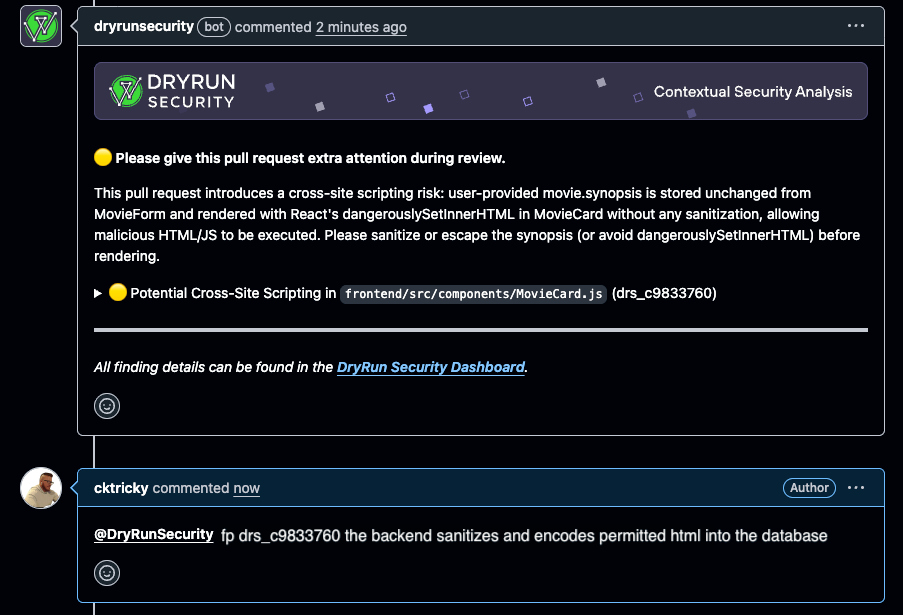
Developers can dismiss findings directly from the pull request thread without leaving their workflow. Dismissals sync to the Risk Register for AppSec review.
To mark a finding as a false positive:
@dryrunsecurity FP [issue ID] details why
To mark a finding as a nitpick:
@dryrunsecurity NIT [issue ID] details why
When a developer submits a dismissal, DryRun Security removes the finding from the active list, regenerates the PR summary comment, and logs the decision for the audit trail. Once the pull request is merged, the explanation is used to inform future scans.
If a finding is incorrectly blocking a merge via branch protection rules, developers can dismiss it directly in the PR thread. DryRun Security automatically removes the block without requiring AppSec intervention. The dismissal is logged so AppSec can review it afterward.
From the Risk Register #
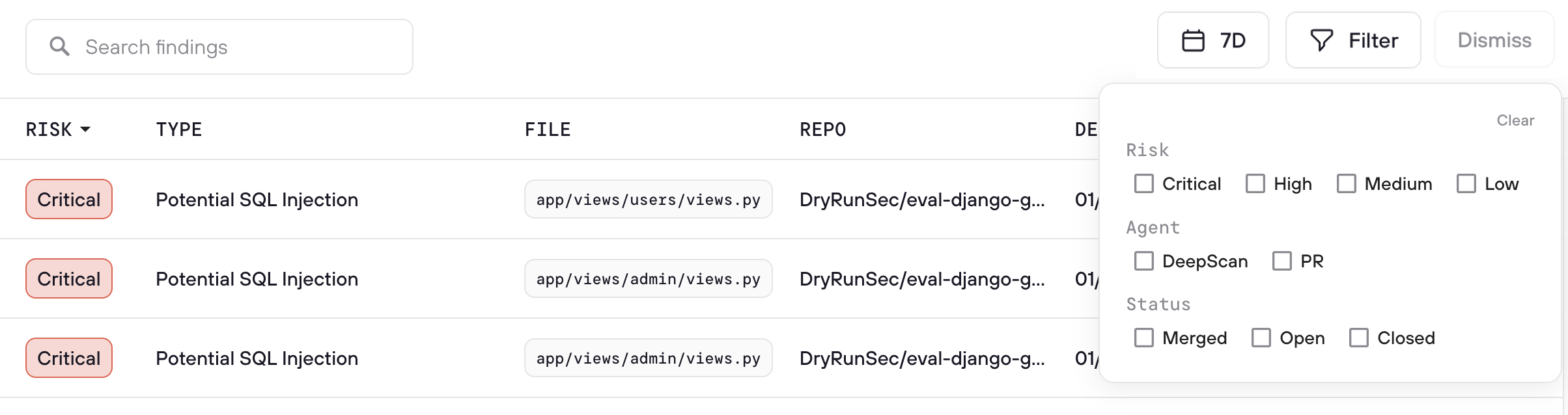
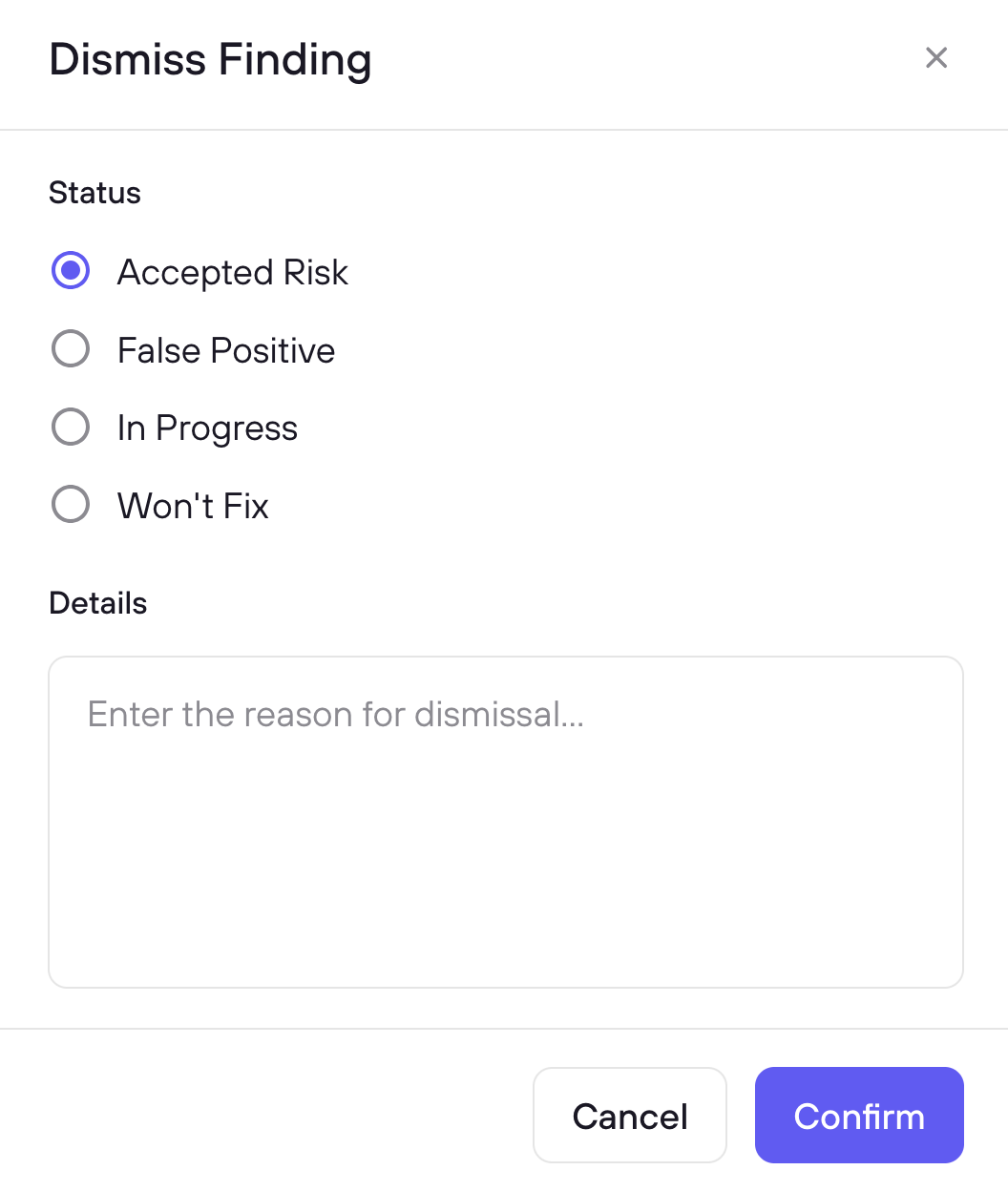
AppSec engineers manage dismissals from the Risk Register, which provides a centralized view across all repositories and scan types. Select one or more findings using the checkboxes, then click Dismiss to choose a status and add context explaining the decision. Context is optional, but dismissals without an explanation are not used to inform future scans.
Dismissing a finding as False Positive or Won’t Fix / Nitpick from the Risk Register also removes the associated failed SCM check on the pull request, clearing the block automatically. Accepted Risk, In Progress, and Resolved dismissals do not automatically clear the SCM check.
From the Risk Register, AppSec teams can also:
- Override dismissals when a finding represents real risk that was incorrectly dismissed
- Monitor dismissal patterns across the organization to identify trends
- Use the audit trail to confirm all triage decisions are intentional and documented
How Dismissals Are Learned #
Dismissals feed into the Code Security Knowledge Graph and are applied across all repositories in your organization. Each fingerprint is scoped to the exact code pattern flagged, and the context you provide can inform similar findings in other repositories within the same organization.
DryRun Security reviews the note attached to each dismissal before storing it. Notes that explain why a finding does not apply, such as a mitigating control, an intended design pattern, or a reason the code path is unreachable, are stored and used to inform future scans. Short notes that do not explain the decision, such as “won’t fix” or “noted,” are not stored. A False Positive or Accepted Risk dismissal without a useful explanation does not become a precedent for future scans.
When dismissals take effect depends on where the finding came from:
- PR scanning: a dismissal on a pull request finding is stored and used once that pull request is merged.
- DeepScan: DeepScan findings are already in merged code, so a dismissal is stored and used immediately. The next DeepScan benefits from the triage.
Note: The more specific the explanation, the more effective the feedback. A note like “This endpoint is protected by the API gateway’s auth layer” teaches DryRun Security far more than “not an issue.”
Dismissed Findings #
View dismissed findings in the Risk Register using the Dismissed filter. Each entry shows the dismissal status, reason, who dismissed it, and when. Use the Restore button to return a finding to the active queue if the dismissal needs to be revisited.