
SCA
Dependency scanning and supply chain risk detection - identify vulnerable third-party packages, assess blast radius, and generate SBOMs.
What Is SCA #
Software Composition Analysis (SCA) identifies the third-party libraries and open-source packages your application depends on and checks whether any carry known security vulnerabilities. The majority of code in any production service comes from the open-source ecosystem, making dependency risk one of the most important areas to monitor. DryRun Security checks each dependency against known vulnerability databases, matching specific CVEs to affected version ranges across all major package ecosystems.
How Scanning Works #
DryRun Security runs SCA through two paths:
DeepScan - When a DeepScan runs, whether triggered manually from the dashboard or programmatically via the API, SCA runs as part of that scan, analyzing dependency manifests and lock files across the entire codebase at that point in time. This is the on-demand path for getting a current snapshot of supply chain risk whenever you need it.
Automatic background scanning - DryRun Security also scans active repositories automatically in the background, entirely independent of DeepScan. These background scans discover new SCA findings as they appear (for example, newly introduced dependencies or newly disclosed CVEs) and update the status of existing findings as manifests and lock files change, all without requiring a manual trigger. Scan frequency is based on PR activity, so the most active repositories are kept up to date most often. See Scan Schedule below.
Reachability Analysis #
Finding a vulnerable dependency is only the first step. DryRun Security evaluates how each vulnerable package is actually used within your codebase to determine whether the vulnerability is reachable from a real code path. A vulnerable function in a library used only for unrelated functionality presents a meaningfully different risk profile than one called directly with user-supplied input. Reachability context surfaces alongside each SCA finding, giving your team the information needed to prioritize remediation based on actual exploitability rather than CVSS scores alone.
Scan Schedule #
Automatic SCA scans are scheduled based on repository PR activity over the last 30 days:
| Activity | Frequency |
|---|---|
| High activity | Daily |
| Moderate activity | Weekly to bi-weekly |
| Low activity | Monthly |
| Inactive (fewer than 3 PRs in 30 days) | No automatic scan |
Repositories that fall below the activity threshold do not receive automatic scans. Trigger a DeepScan manually, from the dashboard or via the API, to get current SCA findings for an inactive repository.
What’s Checked #
DryRun Security scans package manifests and lock files across all major ecosystems:
- JavaScript / Node.js -
package-lock.json,yarn.lock - Python -
requirements.txt,Pipfile,pyproject.toml,poetry.lock,uv.lock - Ruby -
Gemfile,Gemfile.lock - Java / Kotlin -
pom.xml,gradle.lockfile,buildscript-gradle.lockfile,gradle/verification-metadata.xml - Go -
go.mod - Rust -
Cargo.lock - .NET -
*.csproj,deps.json,packages.config,packages.lock.json - PHP -
composer.lock
Note: For Gradle projects, SCA requires a committed dependency lock file. Standard Gradle build files (build.gradle, settings.gradle) are not used for dependency resolution. gradle.lockfile and buildscript-gradle.lockfile are supported at any directory level; gradle/verification-metadata.xml is only read from the repository root.
Viewing Findings #
SCA findings are available in several places in the DryRun Security dashboard: the Risk Register (filter by SCA agent type to see all dependency findings across repositories, alongside PR scan and DeepScan results), Repository pages (SCA findings for a specific repository are visible from that repository’s detail page), the DeepScan page (SCA findings from a DeepScan run are included in the results and can be filtered separately), and the dedicated Dependencies view described below.
Dependencies View #
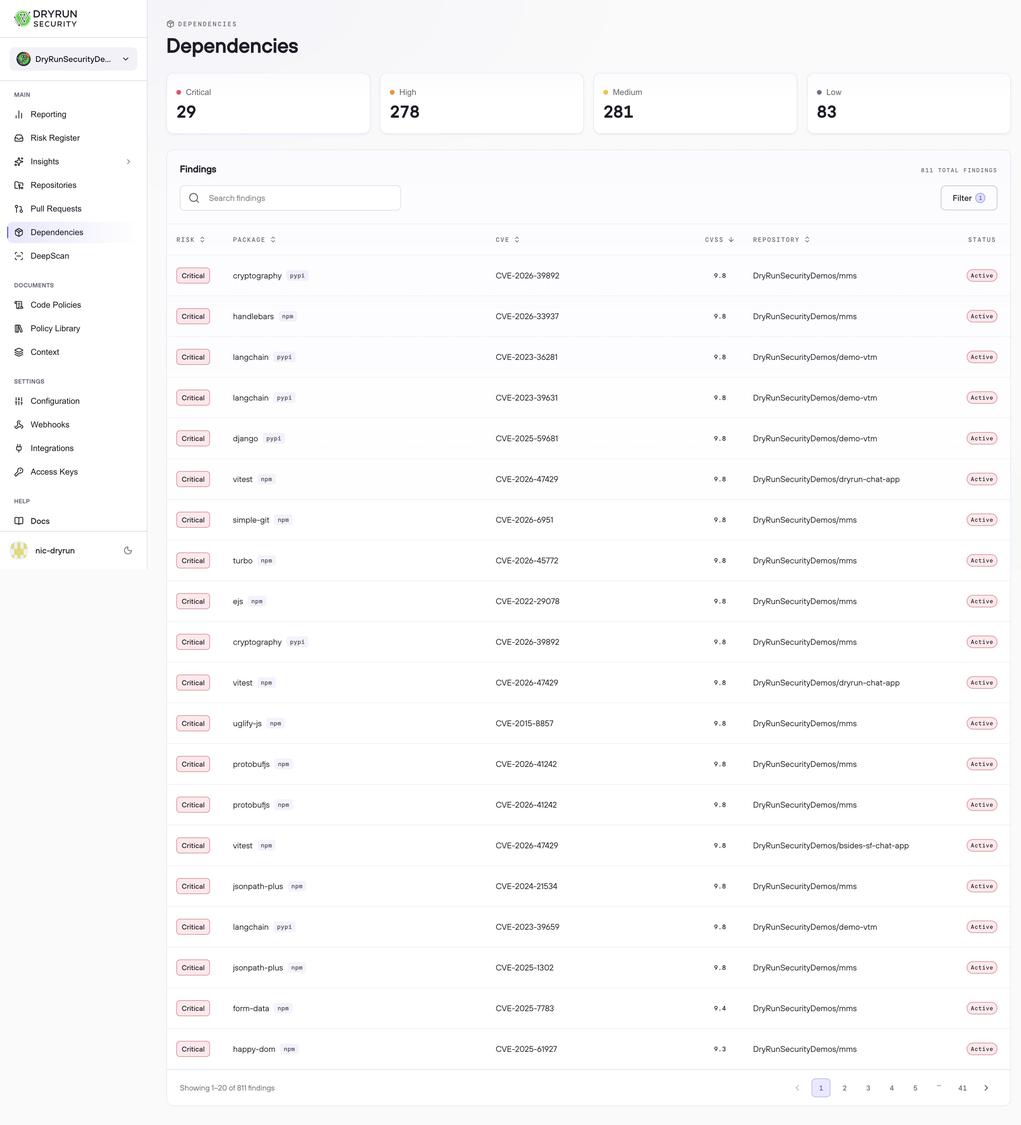
The Dependencies page provides a dedicated CVE-centric view of all SCA findings across your organization's repositories. Four severity cards at the top give an immediate count of Critical, High, Medium, and Low findings. Each row in the findings table represents a unique combination of vulnerable package and CVE, with the repository where it was detected and the current CVSS score.
Findings Table #
The findings table shows all SCA findings across your connected repositories, sorted by CVSS score by default. Each row includes:
- Risk - the severity level: Critical, High, Medium, or Low
- Package - the package name and ecosystem, such as pypi or npm
- CVE - the associated CVE identifier
- CVSS - the CVSS score for the vulnerability
- Repository - the repository where the vulnerable package was detected
- Status - the current lifecycle status of the finding
All columns are sortable. The search bar and filter controls let you narrow results by repository, severity, or other criteria.
Finding Detail #
Clicking any row opens a detail panel with two tabs.
CVE Details shows the full vulnerability context: the package name and ecosystem, CVSS score and vector string, the affected and patched versions, the specific files in the repository where the vulnerable package is declared, first and last detection timestamps, the branch where the finding was observed, a description of the vulnerability, and links to external advisories including NVD, GitHub Security Advisories, and the package maintainer's security pages.
Impacted Repositories lists every repository in your organization where the same vulnerable package version appears. This view makes it straightforward to assess the blast radius of a single CVE across your entire codebase before beginning remediation.
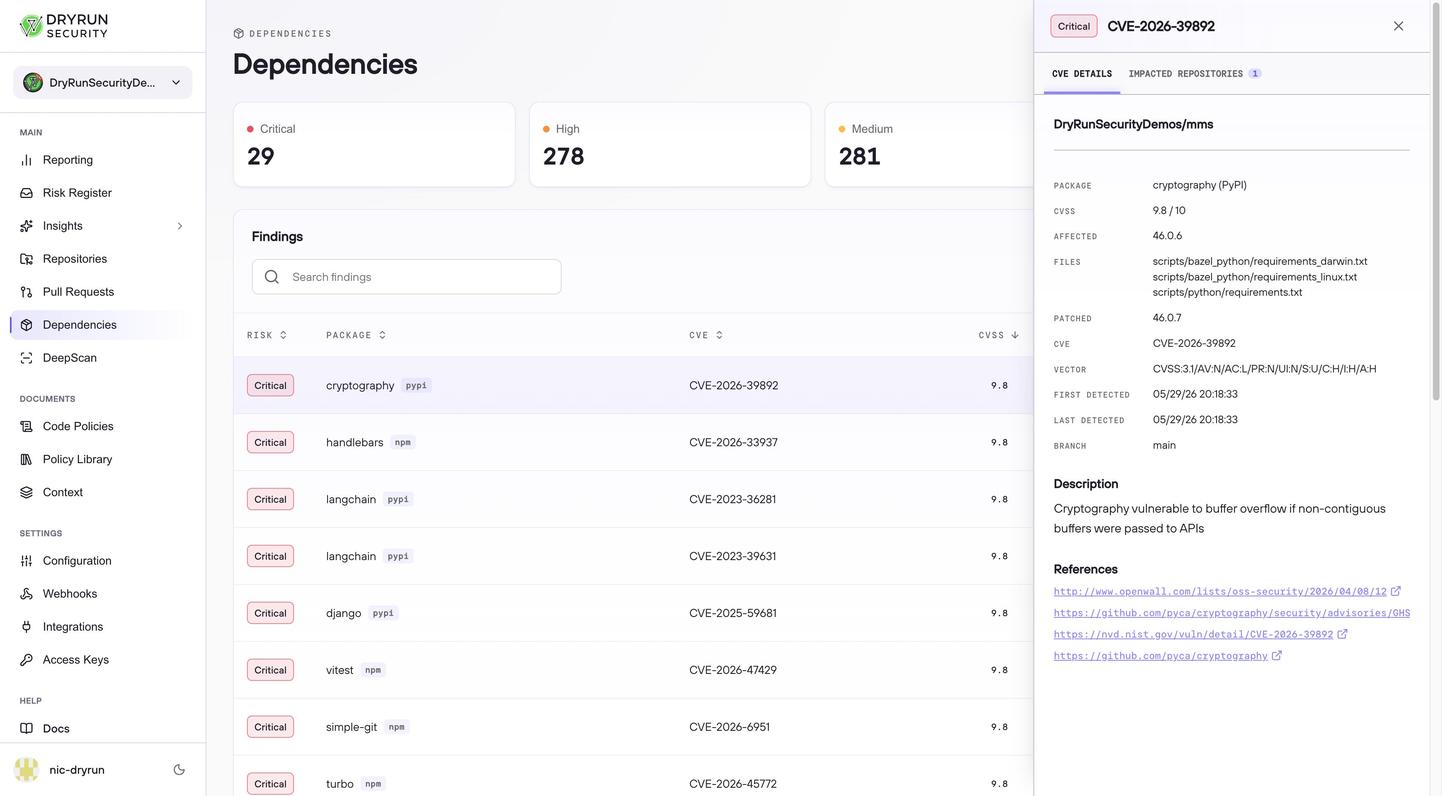
The Dependencies view is a sibling to the Risk Register, sharing the same underlying SCA data. The Risk Register is the primary triage surface for managing finding status across all finding types. The Dependencies view focuses on supply chain risk specifically, with CVE-centric detail and cross-repository impact assessment.
SBOM #
SCA findings feed into SBOM (Software Bill of Materials) generation. DryRun Security generates a complete inventory of your software dependencies from both DeepScan and automatic background scans, retrievable via the DryRun Security API for compliance and audit purposes.