
PR Blocking
Configure DryRun Security to block pull requests when critical vulnerabilities are detected.
Overview #
DryRun Security can be configured to block pull requests from being merged when security findings exceed your defined thresholds. PR Blocking integrates with your source code management platform’s native branch protection features to enforce security gates in your development workflow.
How It Works #
When PR Blocking is enabled, DryRun Security reports its scan results as a required status check on each pull request. If findings meet or exceed the configured severity threshold, the check is marked as failed, preventing the PR from being merged until the issues are resolved.
PR Blocking can be configured at three levels within a Configuration:
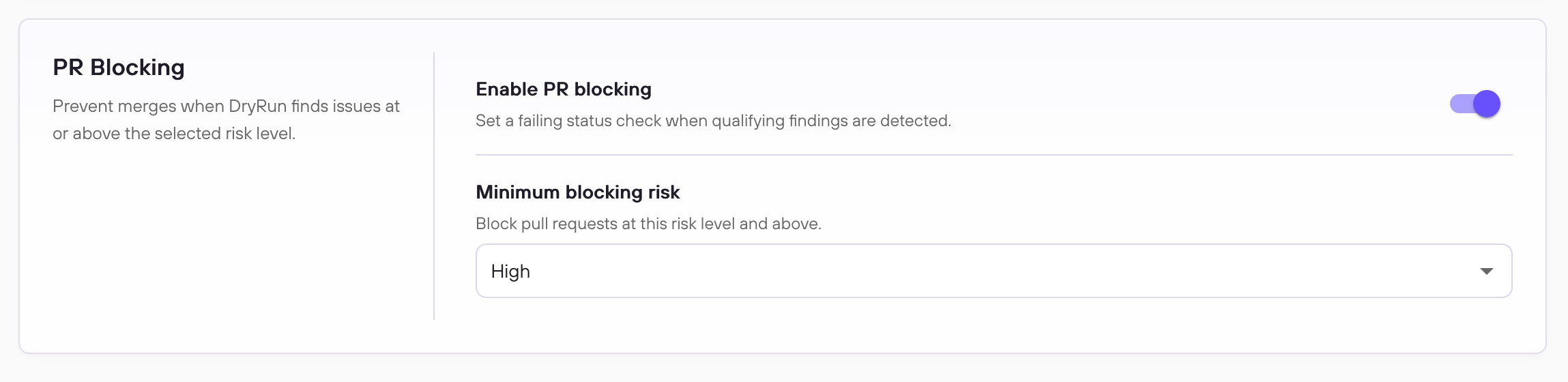
- Severity-based blocking (General tab): the primary mechanism. Enabling PR blocking and setting a Minimum blocking risk threshold sends a failing status check when any Code Security Agent produces a finding at or above that severity. This is a waterfall threshold - setting it to High blocks on High and Critical findings; Medium blocks on Medium, High, and Critical.
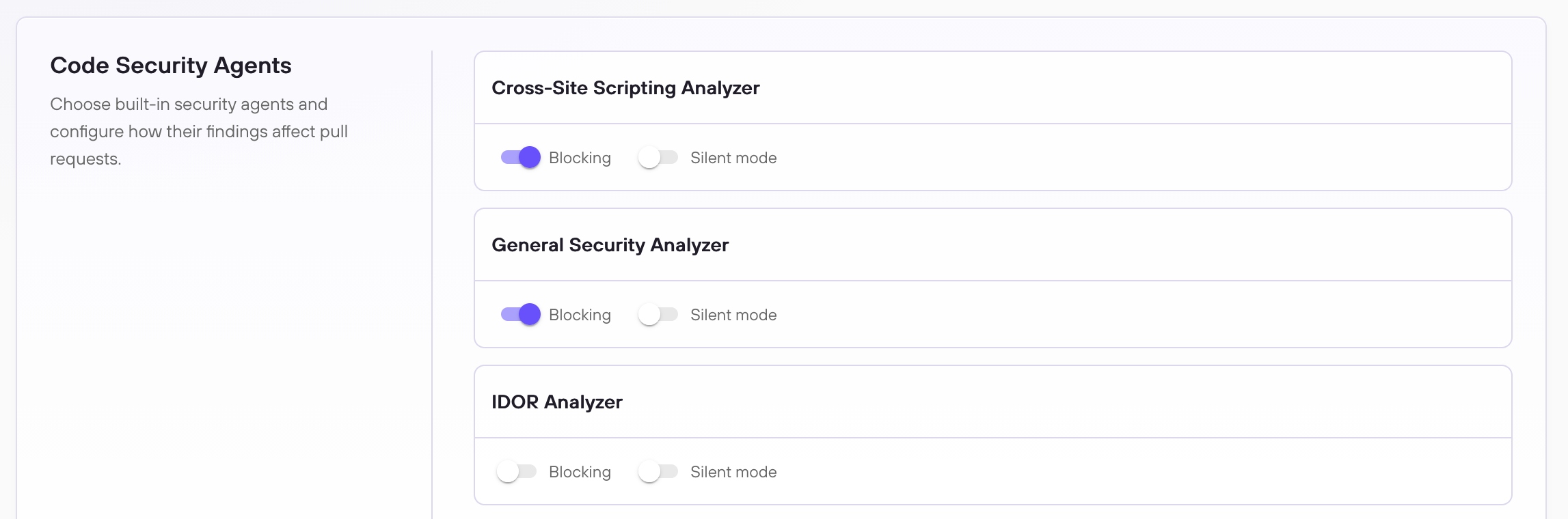
- Per-analyzer blocking (Code Security Agents tab): enabling Blocking on a specific analyzer sends a failing status check whenever that analyzer produces any finding, regardless of severity.
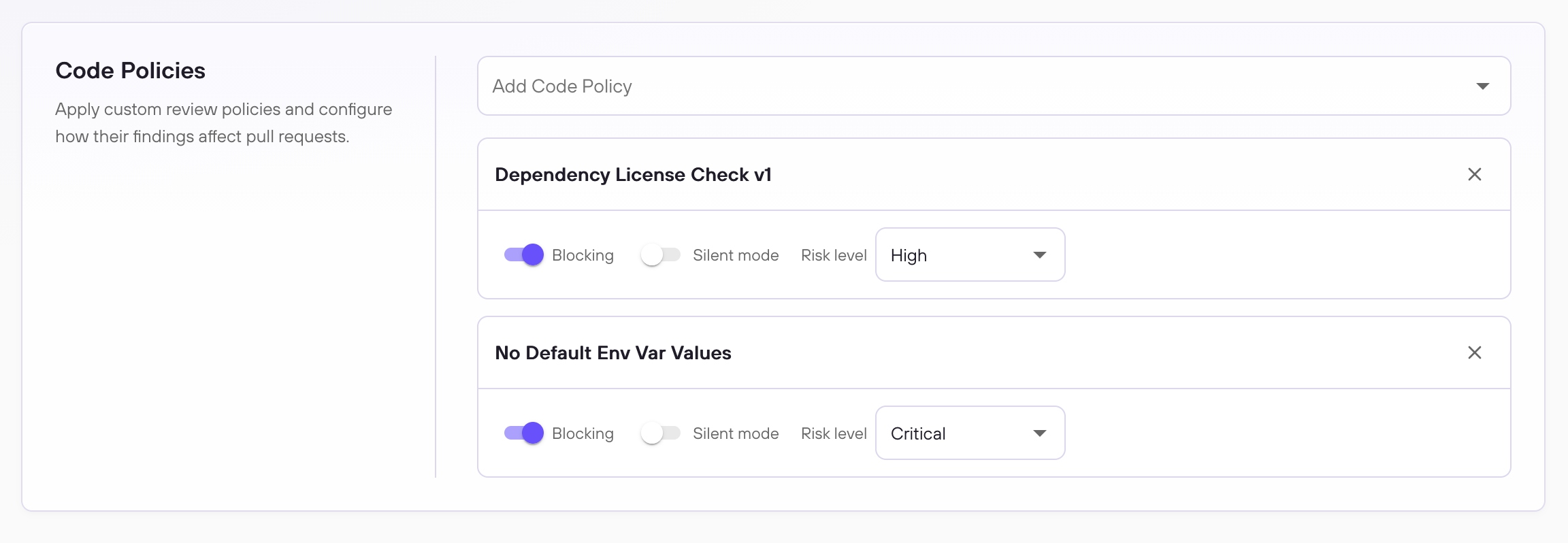
- Per-policy blocking (Code Policies tab): enabling Blocking on a specific Custom Code Policy sends a failing status check whenever that policy produces any finding, regardless of severity.
For most teams, severity-based blocking is the recommended approach. Per-analyzer and per-policy blocking exist for cases where a specific analyzer or policy should always gate merges.
Configuring PR Blocking #
Enabling PR Blocking requires two steps: configuring the blocking threshold in DryRun Security, and configuring branch protection in your SCM to require the DryRun Security status check before merging.
Step 1 - Configure blocking in DryRun Security #
Blocking is enabled from the PR Scanning Configuration page. The General tab controls severity-based blocking across all analyzers. The Code Security Agents and Code Policies tabs let you enable blocking on individual analyzers or policies. See PR Scanning Configuration for a full walkthrough of each option.
Step 2 - Configure branch protection in your SCM #
Once blocking is enabled in DryRun Security, your SCM must be configured to require the corresponding status check before a PR can merge. There are two approaches depending on how broadly you want to apply the rule.
Configure Blocking on GitHub #
These steps apply to both GitHub.com and GitHub Enterprise Server (GHES).
Best Practice: Organization Rulesets #
For teams scanning all repositories, configuring branch protection at the organization level is the recommended approach. An organization ruleset can be configured to apply to all repositories, including new ones added in the future, without requiring per-repo configuration.
- In your organization settings, navigate to Repository > Rulesets.
- Click New ruleset and give it a name.
- Set Enforcement status to Active.
- Optionally configure scope exclusions for users or teams that should be exempt from the rule.
- Under Repository targeting, set the scope. You can target all repositories, by name pattern, by visibility, language, fork status, and more.
- Under Target branches, choose which branches are protected: default branch, all branches, or by pattern.
- Enable Require status checks to pass before merging. Under Status checks that are required, click Add checks, enter
DryRunas the check name, and select DryRunSecurity as the source.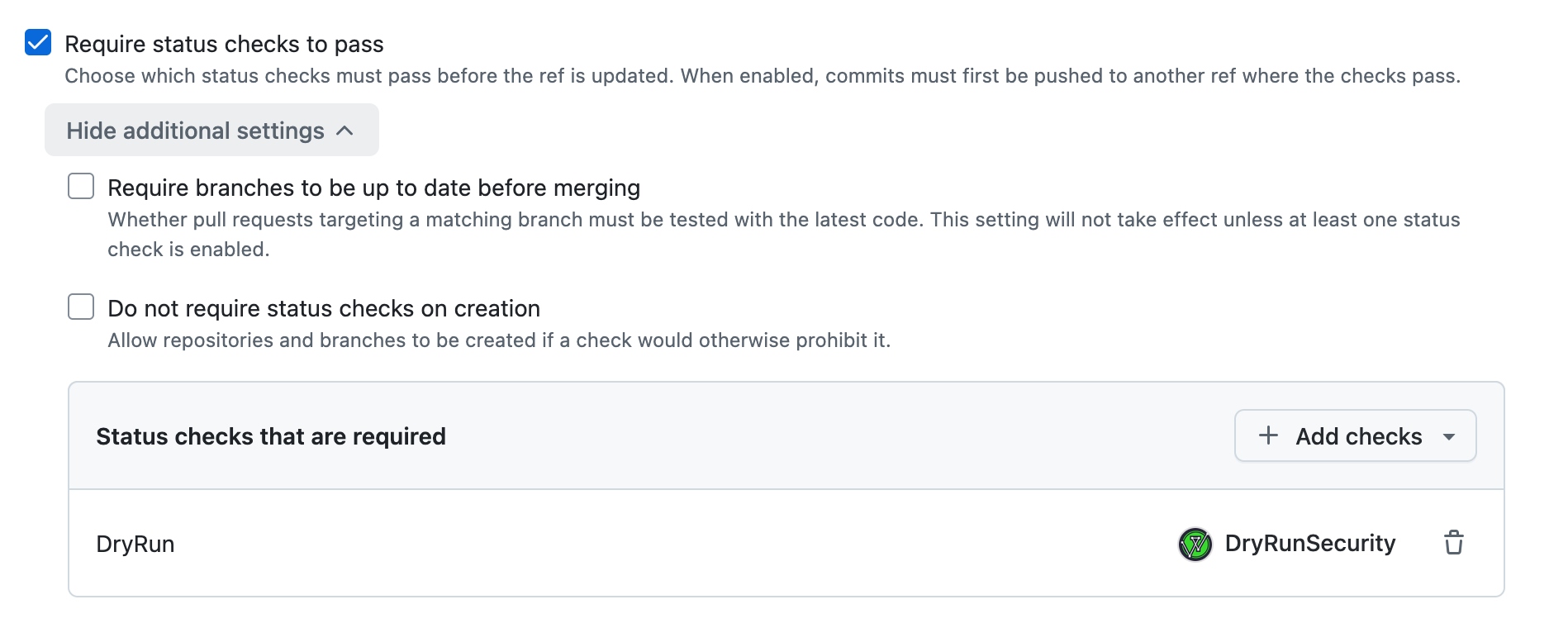
Adding Classic Branch Protection to a Specific Repository #
To apply branch protection at the repository level (for example, to target only a subset of repositories), use a classic branch protection rule.
- On GitHub, navigate to the main page of the repository.
- Under your repository name, click Settings.
- In the Code and automation section of the sidebar, click Branches.
- Click Add classic branch protection rule.
- Under Branch name pattern, type the name of the branch to protect (e.g.,
main). - Enable Require status checks to pass before merging. Search for and select the DryRun Security checks you want to require:
When a Custom Code Policy has Blocking enabled, it appears as a single check under Code Policies. When a Code Security Agent has blocking enabled, it appears under the agent’s name (e.g., Secrets Analyzer).Check name What it covers Cross-Site Scripting Analyzer XSS vulnerabilities across rendering contexts General Security Analyzer Auth gaps, crypto issues, debug artifacts, and more IDOR Analyzer Broken object-level authorization Mass Assignment Unsafe model binding patterns Secrets Analyzer Committed credentials, API keys, and tokens Server-Side Request Forgery Analyzer SSRF via user-controlled outbound requests SQL Injection Analyzer Unsafe query composition Code Policies All custom code policies configured for your team - Click Create.
Configure Blocking with GitLab Merge Request Rules #
When DryRun Security scans a merge request and blocking is enabled, it reports a failed pipeline status on that MR. Enabling Pipelines must succeed in GitLab prevents a merge from completing when any pipeline job fails, including DryRun's scan.
Unlike GitHub, GitLab does not support selecting specific checks. The setting applies to all pipeline jobs.
Best Practice: Group-level Settings #
Configuring the setting at the group level applies it to all projects in the group, including new ones added in the future.
- In your group, go to Settings > General.
- Expand Merge requests.
- Under Merge checks, enable Pipelines must succeed.
- Enable Skipped pipelines are considered successful to prevent MRs from being blocked when a pipeline is skipped rather than failed.
- Save changes.
Targeting Specific Projects #
To apply the requirement to individual projects:
- In the project, go to Settings > Merge requests.
- Under Merge checks, enable Pipelines must succeed.
- Enable Skipped pipelines are considered successful.
- Save changes.
Override Workflow #
When a finding is dismissed as False Positive or Won’t Fix / Nitpick, DryRun Security automatically clears the failing SCM check on the associated pull request. The block lifts as soon as the dismissal is processed, whether submitted from the PR thread or the Risk Register.
Dismissals marked as Accepted Risk, In Progress, or Resolved do not clear the SCM check. The pull request remains blocked until the finding is dismissed as False Positive or Won’t Fix / Nitpick.
All dismissal decisions are logged in the Risk Register for audit purposes.