
PR Scanning Configuration
Learn how DryRun Security configurations control scanning behavior, comments, blocking, and notifications across your repositories.
DryRun Security configurations control how scanning, commenting, PR blocking, and notifications behave across your repositories. You can define one set of settings that applies to every repository in your organization, or create separate configurations for different repository groups, each with its own behavior.
How Configurations Work #
The Configuration page in Settings has two parts: a Default Configuration and a list of Saved Configurations.
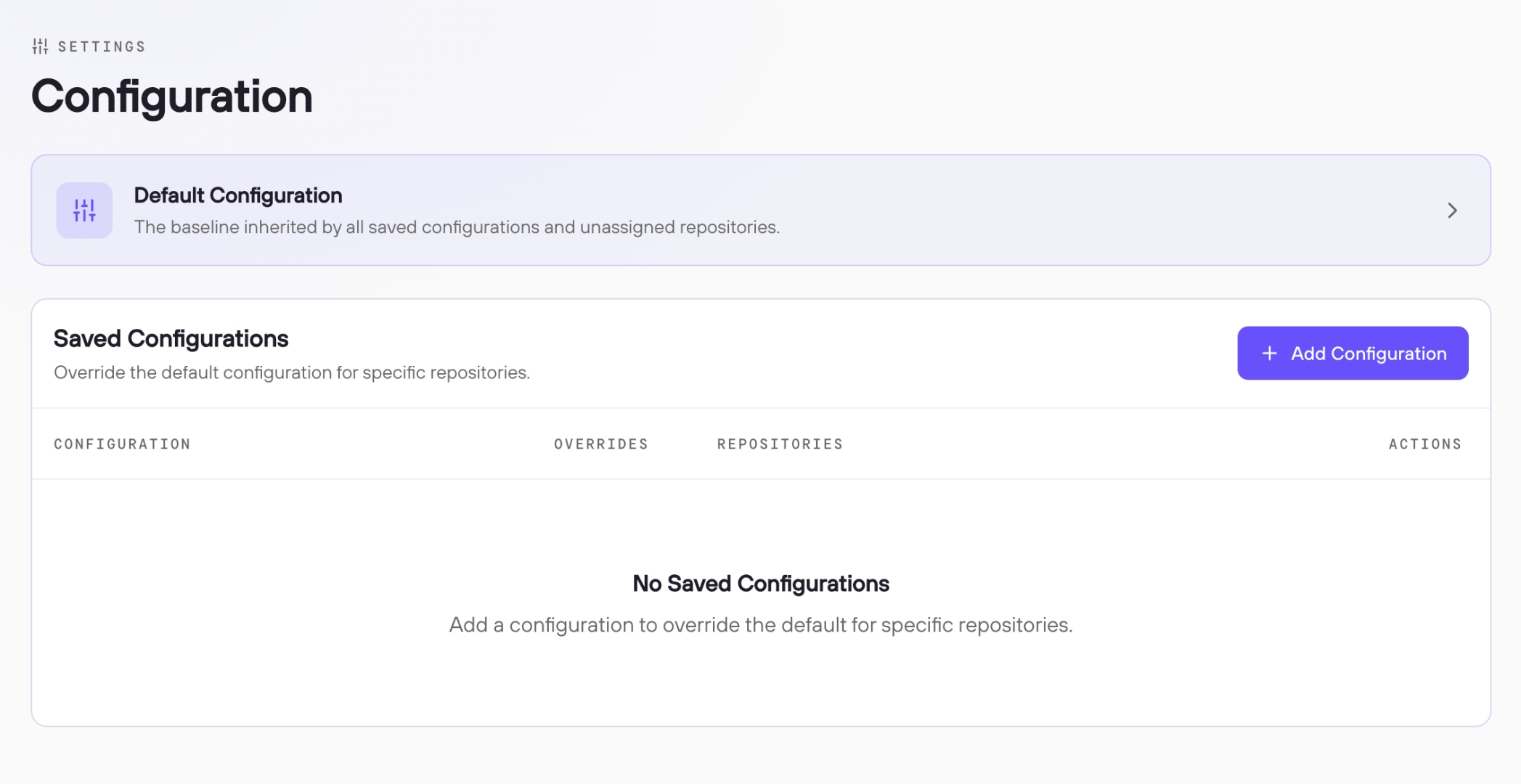
The Default Configuration is always active and applies to every repository in your organization that DryRun Security monitors. It does not require any repository assignment. If you want consistent scanning behavior across your entire organization, edit the Default Configuration directly.
Saved Configurations let you override the default for specific repositories. When you create a new configuration and assign repositories to it, those repositories move out of the Default Configuration scope and are governed exclusively by the new configuration. The Default Configuration continues to apply to all repositories not assigned to a saved configuration.
A repository can only belong to one configuration at a time. If you only need one set of scanning rules for your entire organization, there is no need to create additional configurations.
General Settings #
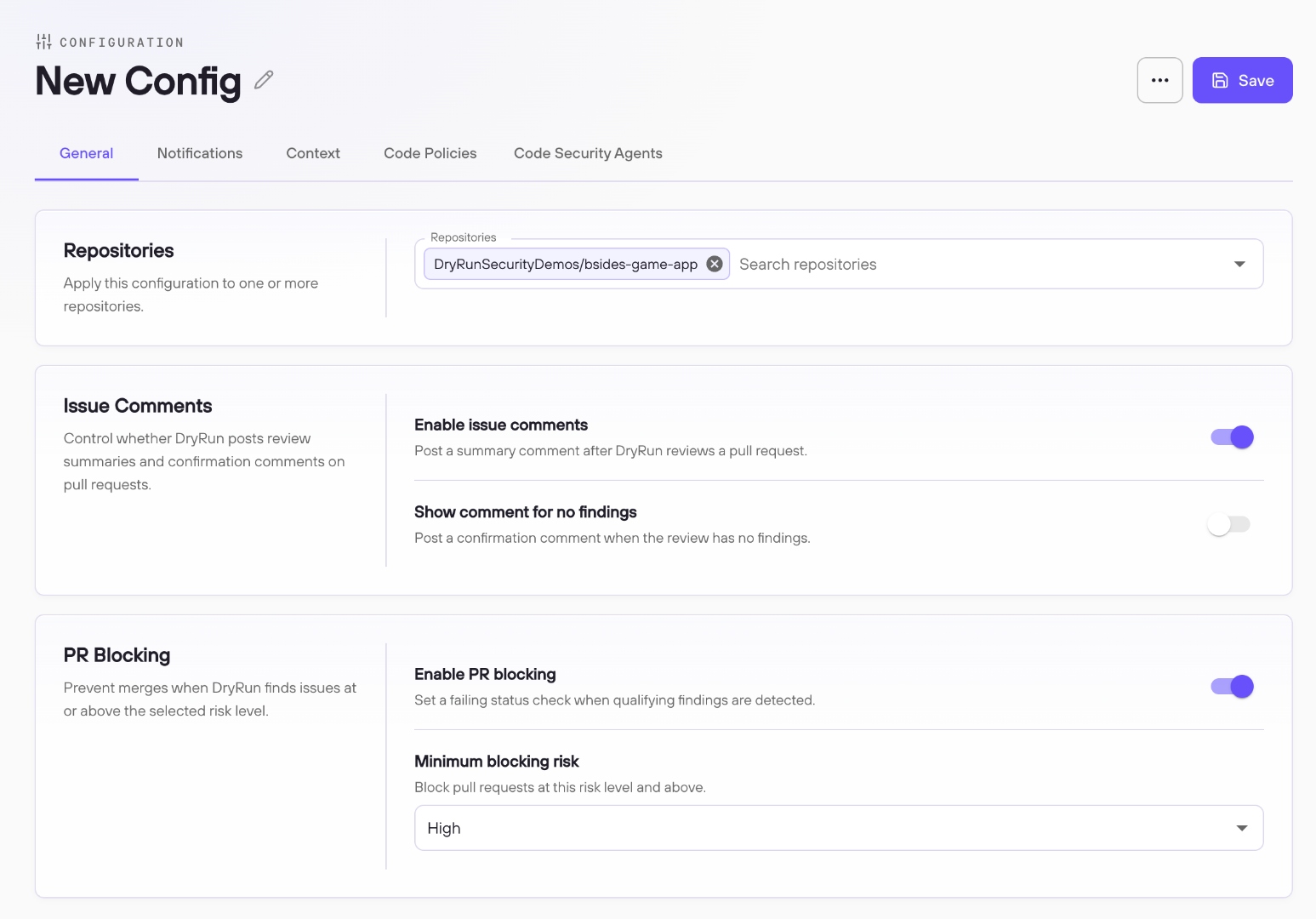
The General tab contains the core controls for PR scanning behavior. The Default Configuration and all saved configurations share the same settings. The one exception is the Repositories selector, which only appears on saved configurations: for a saved configuration you define which repositories it governs, while the Default Configuration applies to all unassigned repositories automatically. You can assign as many repositories as needed to a saved configuration; once assigned, those repositories move out of the Default Configuration scope.
Issue Comments #
Issue Comments control whether DryRun Security posts a review summary to pull requests after scanning.
Enable issue comments is the primary toggle. With comments enabled, DryRun Security posts a summary comment on each pull request after analysis, making findings visible to developers directly in their code review workflow. This is the recommended setting, as it is the primary way developers see and interact with DryRun Security findings.
With comments disabled, DryRun Security still scans every pull request and records findings in the Risk Register, but does not post any comment to the SCM. The findings remain accessible in the DryRun Security dashboard, but developers will not see them in the pull request itself.
Default comment behavior: When a pull request is scanned and has no findings, DryRun Security does not post a comment. A pull request with no DryRun Security comment means the scan ran and found nothing. Developers can confirm the scan ran by checking the status checks on the pull request. If a scan detects findings that are then resolved in a subsequent commit, DryRun Security automatically deletes the comment. Comments only appear when there are active findings to report.
Show comment for no findings changes this behavior in two ways. First, when a scan completes with no findings, DryRun Security posts a comment confirming that no issues were detected. Second, when findings from a previous scan are resolved in a later commit, DryRun Security updates the comment rather than deleting it, so the pull request continues to show a DryRun Security comment reporting no active findings.
PR Blocking #
PR Blocking allows DryRun Security to send a failing status check to your SCM when findings meet or exceed a configured severity threshold, preventing the pull request from being merged until those findings are resolved.
Enable PR blocking activates this behavior for the configuration. When enabled, the Minimum blocking risk dropdown defines the threshold. Selecting High causes any High or Critical finding to produce a failing status check. Selecting Medium causes Medium, High, and Critical findings to block. Lower thresholds block at a broader range of severities.
PR blocking requires branch protection to be configured in your SCM to enforce the status check. This applies to both GitHub Cloud and GitHub Enterprise Server (GHES) repositories. See PR Blocking for full setup instructions.
Notifications #
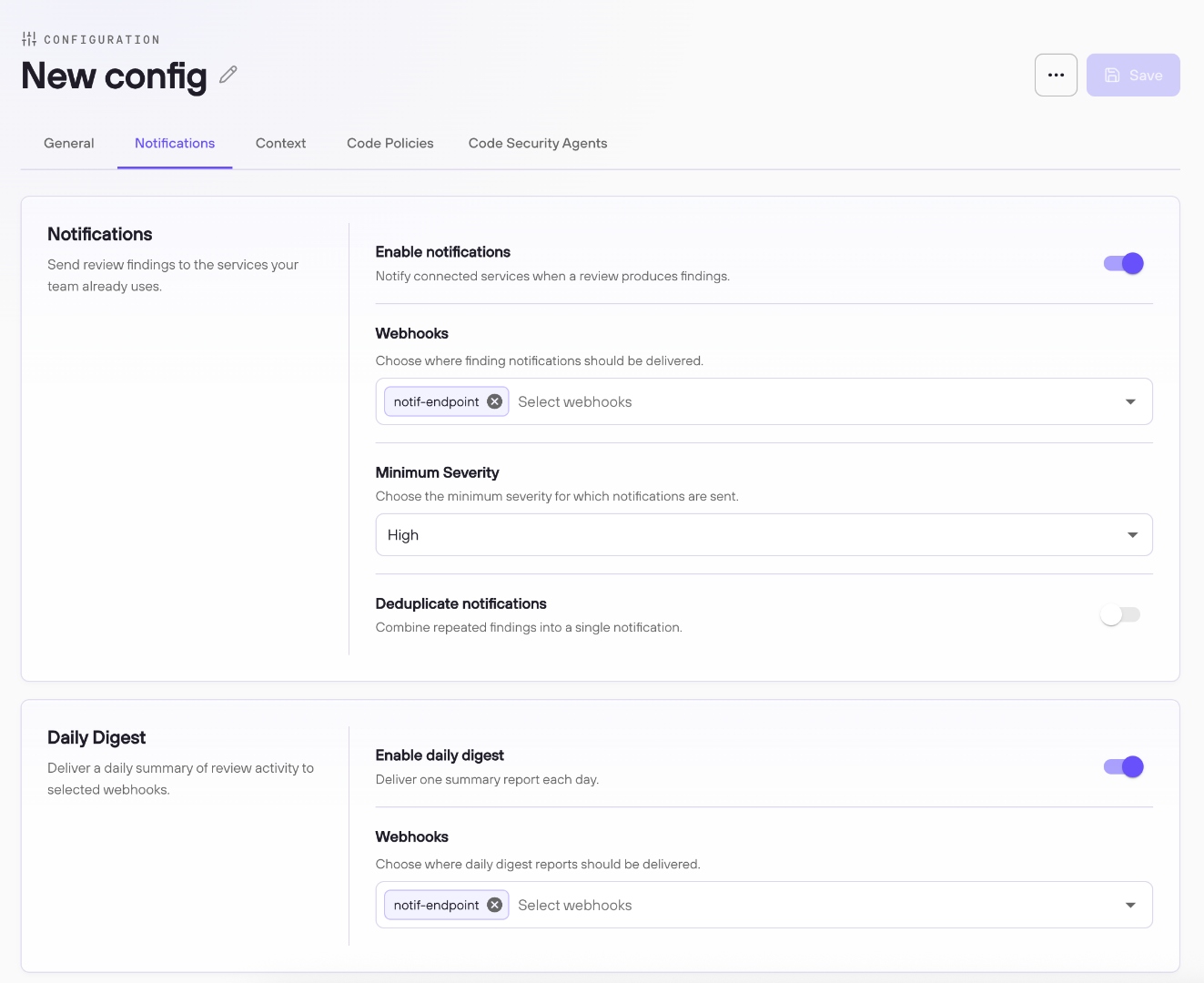
The Notifications tab controls how DryRun Security delivers finding alerts and daily activity digests to your team's existing services via webhook.
Finding Notifications #
Enable notifications activates outbound webhook delivery for this configuration. When enabled, DryRun Security sends a notification to the configured webhook endpoint whenever a PR scan produces findings at or above the minimum severity threshold.
Webhooks defines where notifications are delivered. You must select a webhook endpoint that has already been created. If you have not set one up yet, configure it in Webhooks settings first and then return here to select it. See Webhooks for setup details.
Minimum Severity sets the threshold for triggering a notification. Options are None, Critical, High, Medium, and Low. This is a waterfall threshold: selecting High triggers notifications for High and Critical findings; selecting Medium triggers notifications for Medium, High, and Critical findings. Selecting None triggers a notification when a scan completes with no risk detected, which is useful for teams that want confirmation of a clean scan alongside findings-based alerts.
When a notification is triggered, DryRun Security sends a summary of the findings along with a link back to the dashboard.
Deduplicate Notifications #
Deduplicate notifications is off by default. With deduplication disabled, DryRun Security sends a notification on every PR scan that produces findings at or above the minimum severity. When a developer pushes a new commit to an open PR, a new scan runs and a new notification fires, even if the findings have not changed. On active pull requests this can become noisy.
With deduplication enabled, DryRun Security compares the highest severity on the current scan to the highest severity from the previous scan on the same PR. If the severity has not increased, no new notification is sent. If the severity has increased, for example a PR that previously had a High finding now also has a Critical, a new notification is triggered because the risk level of the PR has changed.
Daily Digest #
Enable daily digest activates a once-daily summary of scanning activity across all repositories in this configuration. The digest is generated by DryRun Security's AI and captures a snapshot of what was analyzed during the day, including new vulnerabilities introduced, changes to authentication-related code, and other notable activity patterns across the scanned repositories.
The daily digest is delivered to a webhook endpoint. You can select the same webhook used for finding notifications or choose a different endpoint.
Context #
The Context tab lets you attach context documents to a configuration, supplementing DryRun Security's built-in contextual scanning with additional security and environmental information about your repositories.
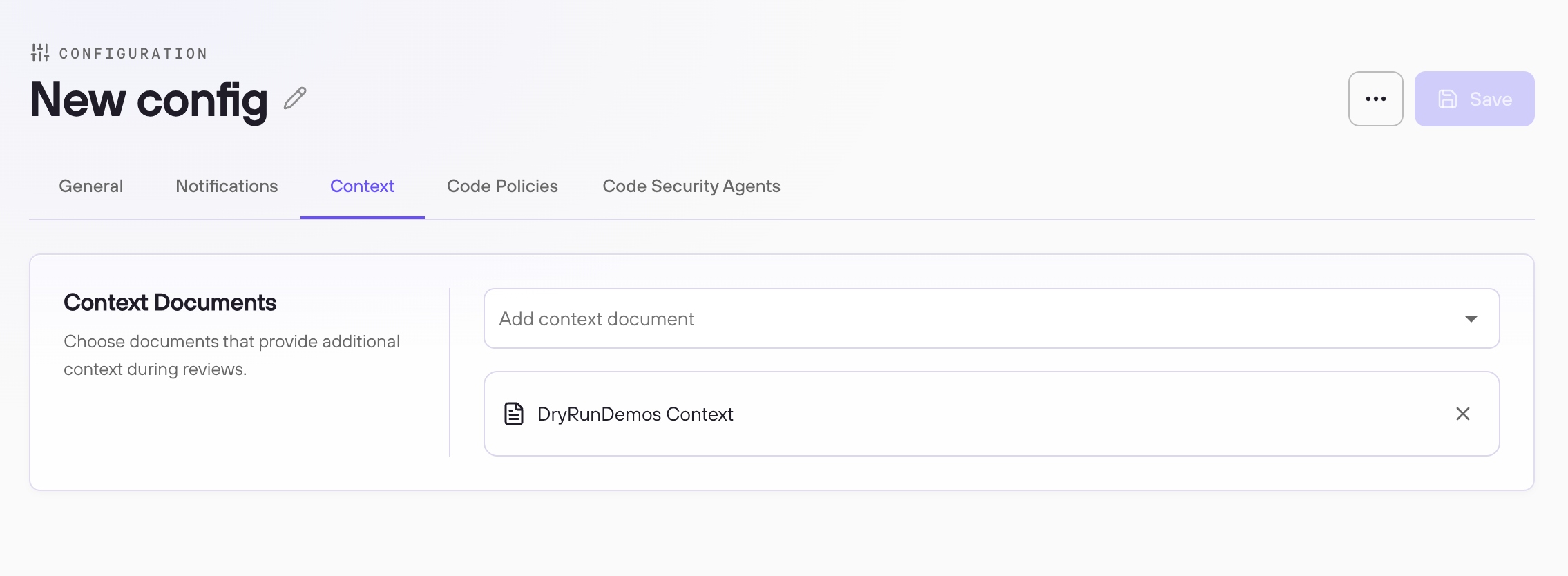
Context documents are Markdown files that describe security-relevant details about your repositories: custom authentication patterns, internal libraries, known trusted code paths, or other environmental information that helps DryRun Security's AI produce more accurate and relevant findings. They are created and managed on the Repository Context page.
Once a context document exists, select it from the Add context document dropdown. The selected context is applied to every repository covered by this configuration during scanning. For more on how contextual scanning works and how to create context documents, see Repository Context.
Code Policies #
The Code Policies tab lets you attach Custom Code Policies to this configuration. Code policies are custom security rules written in plain English that run as additional checks on top of DryRun Security's built-in Code Security Agents. They are created and managed on the Custom Code Policies page.
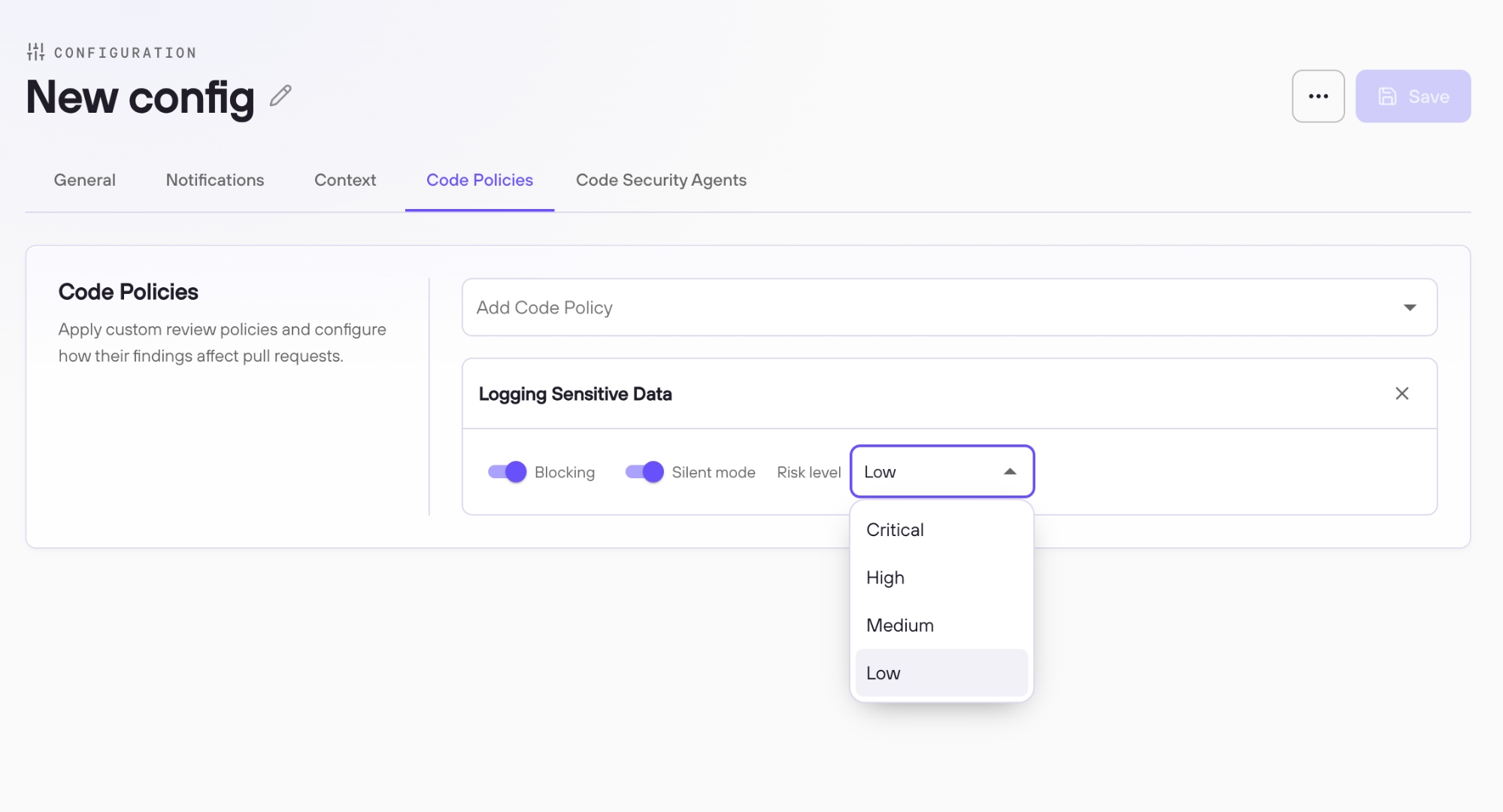
A configuration supports up to seven code policies. Select from your organization's available policies using the Add Code Policy dropdown. Each attached policy runs on every repository in this configuration.
Each attached policy has three configuration options:
Blocking controls whether a violation of this policy sends a failing status check to your SCM. This works differently from the severity-based PR blocking setting on the General tab. Severity-based PR blocking evaluates findings from Code Security Agents against a minimum severity threshold. Code policy blocking is binary: if this policy produces any finding, a failing check is sent regardless of severity. Branch protection must be enabled in your SCM for the check to prevent merging.
Silent mode controls whether this policy's findings appear in the DryRun Security PR comment posted to the developer. With silent mode on, the policy still runs on every scan, findings still appear in the Risk Register, and if blocking is enabled the failing status check is still sent. Silent mode only suppresses the policy's output from the PR comment visible to the developer. This is useful for testing a new policy against real PRs before surfacing its findings to developers.
Risk level defines the severity assigned to every finding this policy produces. Options are Critical, High, Medium, and Low. All findings from this policy are assigned this severity label uniformly.
Code Security Agents #
The Code Security Agents tab lists every built-in analyzer that DryRun Security runs on pull requests. Each analyzer can be configured independently with Blocking and Silent mode controls.
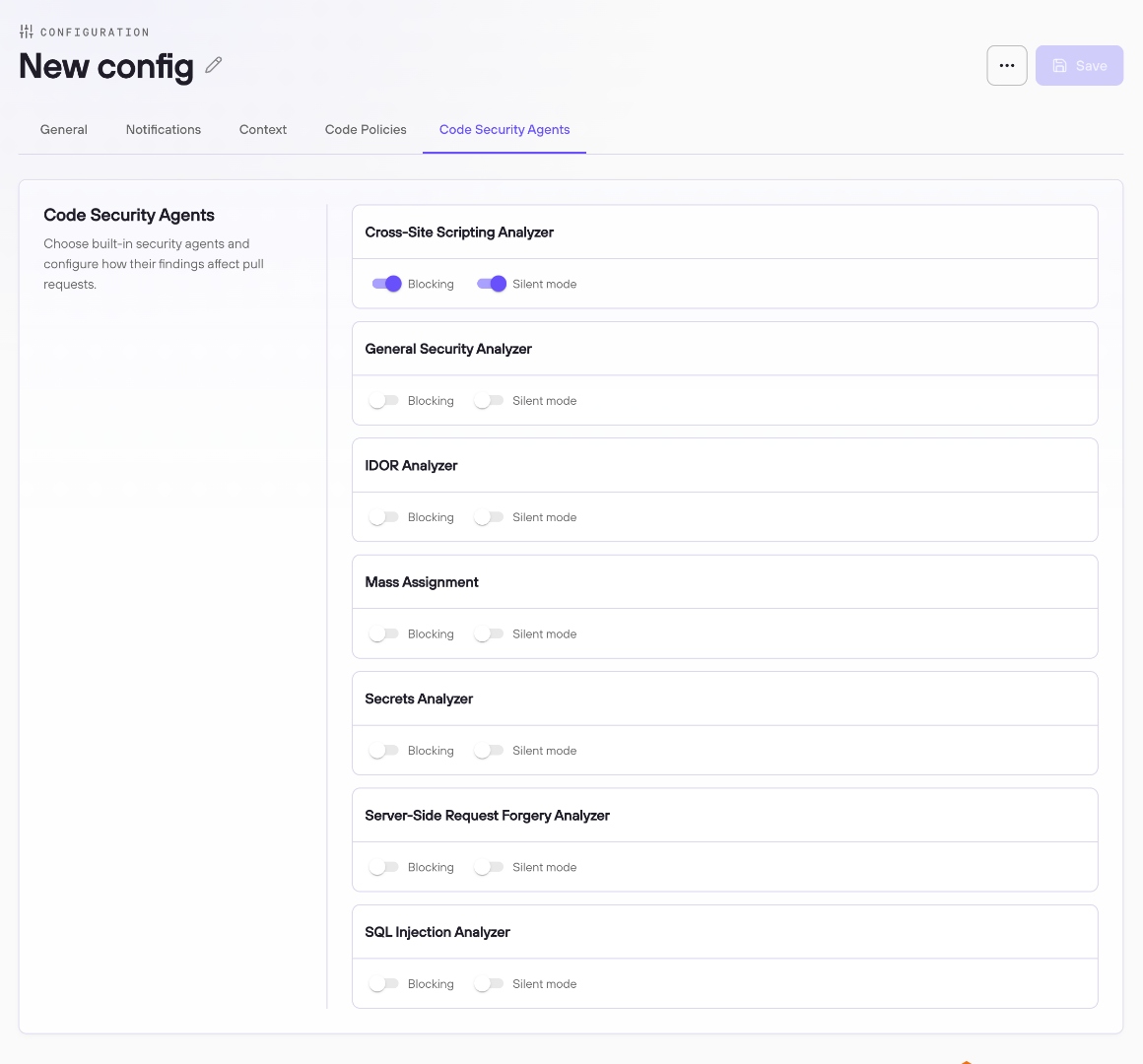
| Analyzer | Description |
|---|---|
| Cross-Site Scripting Analyzer | Detects XSS vulnerabilities across rendering contexts |
| General Security Analyzer | Broad-spectrum analyzer covering auth gaps, crypto, debug artifacts, and more |
| IDOR Analyzer | Surfaces broken object-level authorization |
| Mass Assignment | Detects unsafe model binding patterns |
| Secrets Analyzer | Catches committed credentials, API keys, and tokens |
| Server-Side Request Forgery Analyzer | Identifies SSRF via user-controlled outbound requests |
| SQL Injection Analyzer | Traces data flow to detect unsafe query composition |
Blocking can be enabled per analyzer. This is distinct from the severity-based PR blocking on the General tab, which fires when any finding across all agents meets or exceeds a minimum severity threshold. Per-analyzer blocking is binary: if this analyzer finds anything on a PR, a failing status check is sent to your SCM regardless of the finding's severity. Branch protection must be enabled in your SCM for the check to prevent merging. For most teams, severity-based blocking on the General tab is the recommended approach. Per-analyzer blocking is available for situations where a specific class of vulnerability should always block, independent of how it is scored.
Silent mode suppresses this analyzer's findings from the PR comment posted to the developer. With silent mode on, the analyzer continues to run and its findings are still recorded in the Risk Register. If blocking is also enabled, the failing status check is still sent. Only the PR comment is affected: if the silent analyzer was the only one to produce findings on a given PR, the PR comment will not surface those findings even though they are visible in the Risk Register.
Once all settings across the tabs are configured, click Save. The configuration takes effect on the next scan of each repository assigned to it.